Code Structure
The basic structure of the software is:
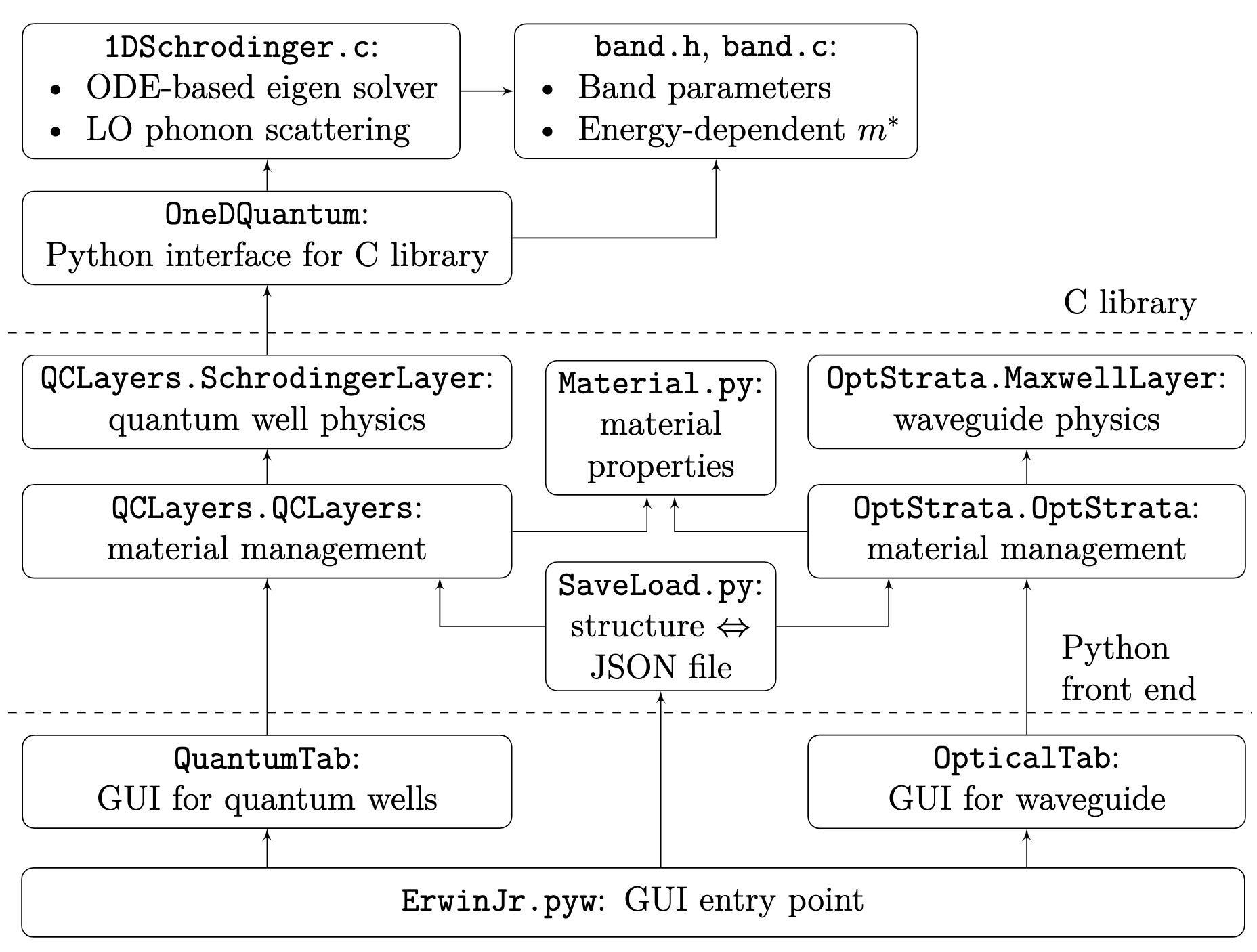
The folder structure:
root
|- ErwinJr2.....................The main souce code
|  |- oned_quantum...............The C library and its Python interface
|  |  |- fftautocorr............A small FFT-based autocorrelation calculator
|  |  |  |- ....
|  |  |- docs...................The Doxygen documentation for the C library
|  |  |- Makefile...............The build system for make
|  |  |- 1DSchrodinger.c
|  |  |- band.c
|  |  |- band.h
|  |  |- science.h
|  |  |- __init__.py
|  |  |- c_schrodinger.pyx
|  |  |- typeDefs.py
|  |- images....................The images needed for the GUI
|  |  |- ....
|  |- example....................Example files as QCL design
|  |- __init__.py
|  |- __main__.py...............This defines how ErwinJr will start outside command line
|  |- opt_strata.py
|  |- qclayers.py
|  |- material.py
|  |- rFittings.py
|  |- save_load.py
|  |- qc_plotter.py
|  |- erwinjr.py
|  |- quantum_tab.py
|  |- optical_tab.py
|  |- ej_canvas.py
|  |- custom_qt_class.py.py
|  |- dark_detect.py
|  |- version.py
|  |- genshortcut.py
|  |- Info.plist............The sample file for creating macOS shortcut
|- test.....................Test cases
|  |- ....
|- docs.....................The documentation, as is shown online
|  |- ....
|- tool.....................Scripts to help developers, git negelets files starting by `p\_`
|  |- ....
|- CHANGELOG
|- LICENSE
|- README.md................This is shown in the project front page in GitHub
|- pyproject.toml...........Part of the setup system required by PEP518
|- setup.py.................The `setuptools` based setup system
|- .readthedocs.yml.........The online documentation generation definition
|- .github..................Configs for github deployment
   |- ....
The C library in oned_quantum has two sets of building system:
make defined in Makefile and Visual Studio
solution file defined in oned_quantum.sln and
1DSchrodinger.vcxproj. They are intended to be consistent,
so that the software behaves the same under Linux/macOS and under Windows.
For the Python code, the project complies with the PEP8 code style, and for the C code, the project complies K&R style.